You can see all account metrics by logging into your Hantec Trader dashboard. The dashboard provides complete overview of your performance, including key risk parameters such as daily loss limit, maximum drawdown, and consistency score (for Instant and Enhanced X programs).
? Step 1: Log in to your dashboard
Access your dashboard using one of the links below:
myhtrader.hmarkets.com/dashboard
Enter your registered credentials to log in.
? Step 2: View your account metrics
Once logged in, you will see your main dashboard panel displaying:
Daily Loss Limit
Maximum Drawdown
Consistency Score (Instant & Enhanced X only)
These metrics are updated in real time and reflect your current trading performance.
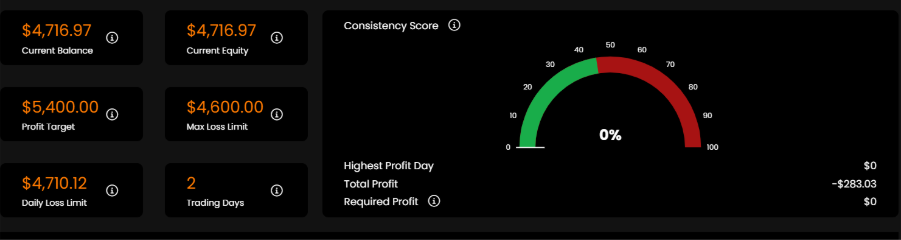
?️ Step 3: Review your performance panel
(Insert first screenshot here)
This section provides a quick snapshot of your account status, including your current balance, risk limits, and overall performance indicators.
? Step 4: Analyze the performance graph
(Insert second screenshot here)
On the graph, you will be able to track:
Your daily balance changes
Your daily drawdown
Your maximum drawdown over time
This allows you to understand how your account evolves day by day and helps you manage your risk more effectively.
⚠️ Important
All metrics are calculated in real time
It is your responsibility to monitor your account regularly
Breaching any limits may result in account violation
Was this article helpful?
That’s Great!
Thank you for your feedback
Sorry! We couldn't be helpful
Thank you for your feedback
Feedback sent
We appreciate your effort and will try to fix the article